In today’s digital world, storing data efficiently is just as important as processing it. Every computer and electronic device relies on physical storage to save operating systems, software applications, documents, images, videos, and other digital information. Without reliable storage, data would be lost whenever a device is powered off, making long-term data management impossible.
As technology continues to evolve, understanding how data is stored has become an essential part of computer science and information technology. Different storage technologies are designed to meet different needs, such as high capacity, fast performance, portability, or long-term data preservation. Choosing the right storage solution depends on several factors, including storage requirements, performance expectations, and intended use.
This article provides a comprehensive overview of physical storage mediums and their role in modern computing. You will learn what physical storage mediums are, explore the most common types used today, understand how operating systems organize data through file allocation, and discover how fragmentation can affect storage performance. By the end of this guide, you will have a clear understanding of how storage devices work and how efficient storage management contributes to improved system performance and reliable data access.
What Are Physical Storage Mediums?
Physical storage mediums are hardware devices that store digital information so it can be accessed whenever needed. Unlike temporary memory, which only holds data while a computer is running, physical storage retains information even after the device has been turned off. This allows users to save files permanently and retrieve them whenever required.
Physical storage is an essential component of every computer system because it provides a place to store operating systems, software applications, documents, multimedia files, databases, and other important information. Without physical storage, computers would not be able to preserve data between sessions, making everyday computing tasks impossible.
It is important to distinguish physical storage from primary memory. Primary memory, commonly known as Random Access Memory (RAM), temporarily stores data that the processor is actively using. Once the computer is shut down, the contents of RAM are erased. Physical storage, often referred to as secondary storage, is designed for long-term data retention and continues to store information even when the device is powered off.
Because digital data continues to grow rapidly in both personal and business environments, physical storage plays a vital role in ensuring information is stored securely, remains accessible, and can be managed efficiently. This makes it one of the most important components of any modern computing system.
Types of Physical Storage Mediums
Several types of physical storage mediums are used in modern computing, each designed for specific storage requirements. Some devices are ideal for storing large amounts of data, while others are better suited for portability, media distribution, or long-term backups.
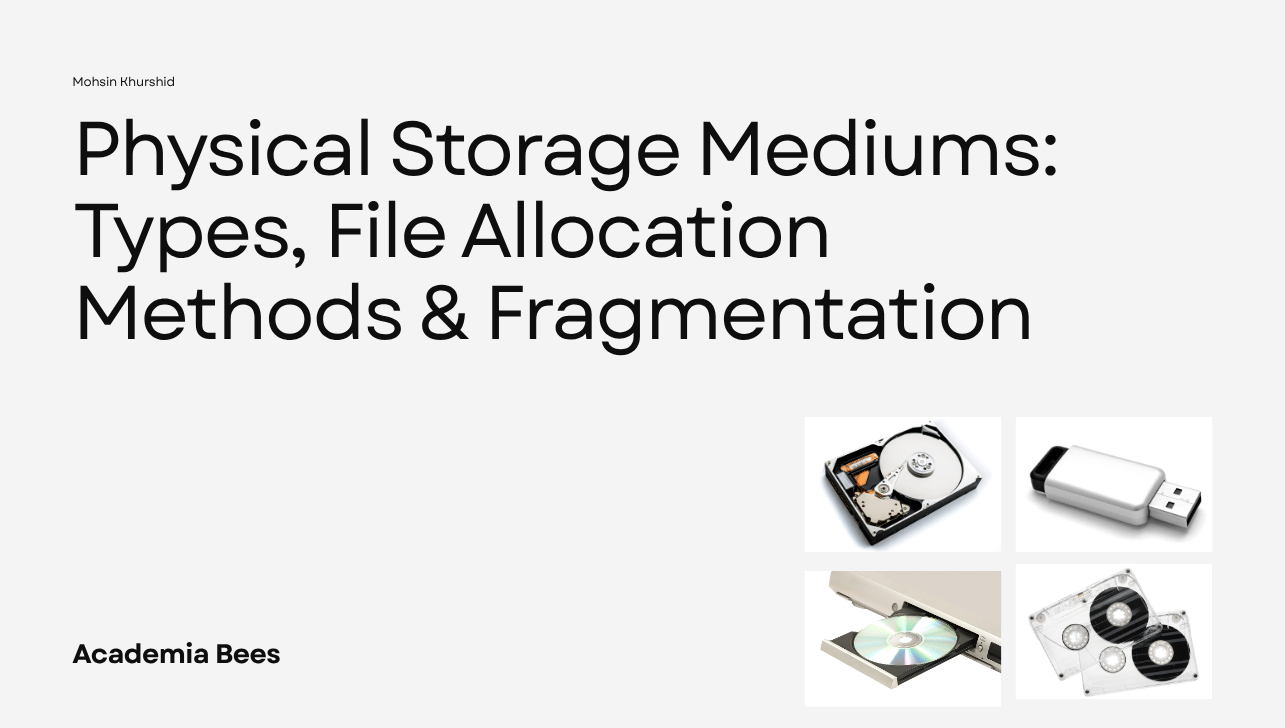
The most common physical storage mediums include:
- Hard Disk Drive (HDD)
- Flash Drive
- DVD (Digital Versatile Disc)
- Magnetic Tape
Each storage medium uses a different technology to store data and offers its own advantages and limitations. In the following sections, we will explore each of these storage devices in detail to better understand how they work and where they are commonly used.
Hard Disk Drive (HDD)
A Hard Disk Drive (HDD) is a magnetic storage device used to store and retrieve digital data. It has been one of the most widely used storage solutions for desktop computers, laptops, servers, and external storage devices for many years. Although newer technologies such as Solid-State Drives (SSDs) have become increasingly popular, HDDs remain a preferred choice when large storage capacity is required at a lower cost.
An HDD stores information on one or more circular disks called platters, which are coated with a magnetic material. These platters spin at high speeds while a mechanical read/write head moves across their surface to read existing data or write new information. The combination of spinning platters and moving read/write heads allows the drive to access stored files whenever requested by the operating system.
Modern hard disk drives are available in a wide range of capacities, typically starting from 500 GB and extending beyond 20 TB for enterprise models. Their large storage capacity makes them suitable for storing operating systems, software applications, multimedia files, databases, games, and system backups.
Advantages of Hard Disk Drives
- Offers large storage capacity at an affordable price.
- Lower cost per gigabyte compared to many other storage technologies.
- Widely available in both internal and external versions.
- Suitable for storing large files, backups, and multimedia collections.
- Reliable for everyday personal and business computing.
Disadvantages of Hard Disk Drives
- Slower data access compared to Solid-State Drives (SSDs).
- Contains moving mechanical parts that are vulnerable to physical damage.
- Generates more heat, noise, and power consumption than flash-based storage.
- Performance may decrease as the drive ages or becomes heavily used.
Common Applications
Hard disk drives are commonly used in desktop computers, budget laptops, external backup drives, network-attached storage (NAS), surveillance systems, gaming PCs, and enterprise servers. They are particularly suitable for users who require high storage capacity without significantly increasing hardware costs.
Flash Drive
A Flash Drive, also known as a USB flash drive, is a portable storage device that uses flash memory to store digital data. Unlike a Hard Disk Drive (HDD), a flash drive has no moving mechanical parts, making it faster, more durable, and more resistant to physical damage. It connects to computers and other compatible devices through a USB port, allowing users to quickly transfer or store files.
Flash drives are available in a wide range of storage capacities, typically ranging from 8 GB to 2 TB. The most commonly used capacities are 32 GB, 64 GB, 128 GB, and 256 GB, which are sufficient for storing documents, presentations, photos, videos, and software applications.
Advantages of Flash Drives
- Compact and lightweight, making them easy to carry.
- Faster data transfer than optical storage media such as DVDs.
- No moving parts, resulting in greater durability.
- Low power consumption.
- Compatible with most computers, laptops, smart TVs, and gaming consoles.
Disadvantages of Flash Drives
- More expensive per gigabyte than traditional hard disk drives.
- Easy to lose due to their small size.
- Limited lifespan because flash memory supports a finite number of write and erase cycles.
- Lower maximum storage capacity compared to enterprise hard drives.
Common Applications
Flash drives are widely used for transferring files between computers, storing personal documents, backing up important data, installing operating systems, and carrying portable software. Their portability and ease of use make them one of the most popular storage devices for students, professionals, and everyday computer users.
DVD (Digital Versatile Disc)
A Digital Versatile Disc (DVD) is an optical storage medium that stores data using laser technology. Information is recorded on the surface of the disc as microscopic marks, which are read by a laser inside a DVD drive. DVDs became extremely popular for distributing movies, software, music, and educational content before cloud storage and flash-based devices became widely available.
DVDs are available in several formats, including DVD-ROM, DVD-R, DVD+R, DVD-RW, and DVD+RW. A standard single-layer DVD can store approximately 4.7 GB of data, while a dual-layer DVD can hold around 8.5 GB.
Advantages of DVDs
- Affordable and widely available.
- Suitable for distributing software and multimedia content.
- Can preserve data for many years when stored properly.
- Does not require an internet connection to access stored files.
Disadvantages of DVDs
- Limited storage capacity compared to modern storage devices.
- Slower read and write speeds than flash drives and hard disks.
- Easily scratched or physically damaged.
- Many modern laptops no longer include built-in DVD drives.
Common Applications
DVDs are commonly used for movie distribution, software installation, educational materials, archival storage, and sharing digital content. Although their popularity has declined with the rise of cloud storage and USB devices, DVDs continue to be used where physical media is preferred or required.
Magnetic Tape
Magnetic Tape is one of the oldest digital storage technologies and is still widely used for large-scale data backup and long-term archival storage. It stores information on a long strip of plastic tape coated with magnetic material. Data is written and read sequentially along the tape, making it different from storage devices that allow direct access to individual files.
Modern magnetic tape systems, such as Linear Tape-Open (LTO) technology, offer extremely high storage capacities, with a single cartridge capable of storing several terabytes of compressed data. This makes magnetic tape an economical solution for organizations that need to archive massive amounts of information.
Advantages of Magnetic Tape
- Very high storage capacity.
- Cost-effective for long-term data storage.
- Long lifespan when stored under proper environmental conditions.
- Low power consumption because tapes require power only during reading or writing.
Disadvantages of Magnetic Tape
- Slow data retrieval due to sequential access.
- Requires specialized tape drives and backup systems.
- Not suitable for frequently accessed files.
- Less convenient for everyday personal computing.
Common Applications
Magnetic tapes are primarily used by businesses, government agencies, healthcare organizations, research institutions, and cloud service providers for backup, disaster recovery, and long-term archival. Their ability to store large volumes of data at a relatively low cost makes them an important storage solution in enterprise environments.
Comparison of Physical Storage Mediums
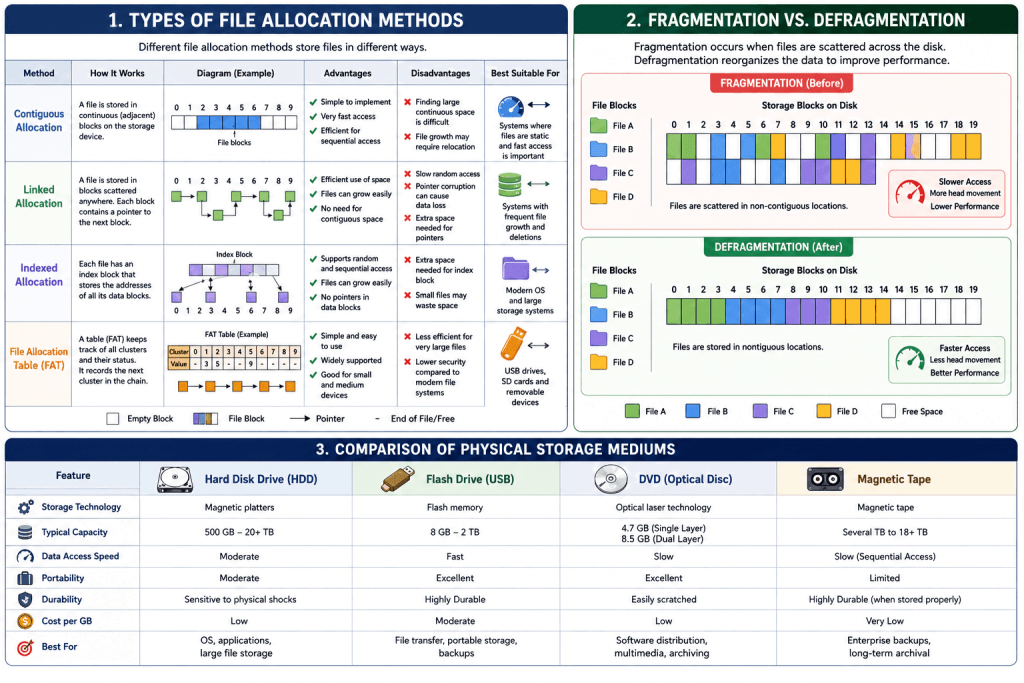
The four physical storage mediums discussed above each have their own strengths and limitations. While all of them are designed to store digital data, they differ in terms of storage technology, capacity, speed, portability, durability, and typical applications. The following table provides a quick comparison to help you understand their key differences.
| Feature | Hard Disk Drive (HDD) | Flash Drive | DVD | Magnetic Tape |
| Storage Technology | Magnetic platters | Flash memory | Optical disc | Magnetic tape |
| Typical Capacity | 500 GB – 20+ TB | 8 GB – 2 TB | 4.7 GB (Single Layer), 8.5 GB (Dual Layer) | Several TB to 18+ TB |
| Data Access Speed | Moderate | Fast | Slow | Slow (Sequential Access) |
| Portability | Moderate | Excellent | Excellent | Limited |
| Durability | Sensitive to physical shocks | Highly durable | Easily scratched | Highly durable when stored properly |
| Cost per GB | Low | Moderate | Low | Very Low |
| Best For | Operating systems, applications, large file storage | File transfer, portable storage, backups | Software distribution, multimedia, archiving | Enterprise backups and long-term archival |
The choice of a physical storage medium depends on the user’s specific requirements. For example, an HDD is suitable for users who need large storage at a low cost, while a flash drive is ideal for portability and quick file transfers. DVDs are useful for distributing or archiving data, whereas magnetic tapes are preferred for large-scale backups and long-term data preservation in enterprise environments.
What Is File Allocation?
Whenever you save a file on a storage device, the operating system must decide where that file should be stored and how its location will be recorded. This process is known as file allocation.
File allocation is the method used by an operating system to organize and manage files on a storage device. Instead of storing every file randomly, the operating system follows a structured approach that determines where each file is placed and how it can be located later. This organization ensures that files can be created, accessed, modified, and deleted efficiently.
Storage devices are divided into many small storage units called blocks, clusters, or sectors. When a file is saved, it is stored within these units, and the operating system keeps track of their locations. Whenever the user opens the file, the operating system uses this stored information to retrieve the data quickly and accurately.
An efficient file allocation system is important because it helps to:
- Organize files systematically on a storage device.
- Improve the speed of file access and retrieval.
- Make efficient use of available storage space.
- Simplify file management for the operating system.
- Ensure that stored data can be located reliably whenever it is needed.
Different operating systems use different techniques to allocate files on storage devices. Each technique is designed to balance storage efficiency, performance, and ease of file management. In the next section, we will explore the most common types of file allocation methods and understand how each one works, along with its advantages and disadvantages.
Types of File Allocation Methods
After understanding what file allocation is, the next step is learning how operating systems actually organize files on a storage device. Over the years, several file allocation methods have been developed to improve storage efficiency and make file retrieval easier. Each method stores files differently and has its own advantages and limitations.
The four most common file allocation methods are:
- Contiguous Allocation
- Linked Allocation
- Indexed Allocation
- File Allocation Table (FAT)
Let’s look at each method in detail.
Contiguous Allocation
Contiguous allocation is one of the simplest methods of storing files. In this method, all the blocks belonging to a file are stored in continuous (adjacent) locations on the storage device. When a file is created, the operating system searches for a large enough block of consecutive free space and stores the entire file there.
Since all file blocks are stored together, the operating system only needs to know the starting block and the file size to access the complete file.
Advantages of Contiguous Allocation
- Simple to implement and manage.
- Provides very fast file access because data is stored in consecutive locations.
- Sequential reading and writing are highly efficient.
- Requires minimal overhead to locate files.
Disadvantages of Contiguous Allocation
- Finding a large continuous free space becomes difficult as storage fills up.
- Expanding an existing file may require moving it to a new location if sufficient adjacent space is unavailable.
- Storage space may not always be utilized efficiently.
Suitable Applications
Contiguous allocation is suitable for systems where files are relatively fixed in size and are not modified frequently. It works well in environments where fast sequential access is more important than flexibility.
Linked Allocation
Linked allocation stores a file as a series of blocks that may be located anywhere on the storage device. Instead of placing all blocks together, each block contains a pointer that indicates the location of the next block in the file. The operating system follows these pointers until it reaches the final block.
Because blocks do not need to be stored next to each other, linked allocation makes better use of available storage space.
Advantages of Linked Allocation
- Files can grow without requiring continuous free space.
- Makes efficient use of available storage.
- File expansion is simple because new blocks can be added anywhere.
- Eliminates the need to relocate files when they become larger.
Disadvantages of Linked Allocation
- Sequential access is slower because each block must be followed through pointers.
- Random access is inefficient since the system must traverse the linked blocks one by one.
- If a pointer becomes corrupted, access to the remaining part of the file may be lost.
- Additional storage space is required for storing pointers.
Suitable Applications
Linked allocation is useful for systems where files change frequently in size and where efficient utilization of storage space is more important than high-speed random access.
Indexed Allocation
Indexed allocation was developed to overcome some of the limitations of contiguous and linked allocation. In this method, each file has a separate index block that stores the addresses of all the blocks belonging to that file. Instead of linking data blocks together, the operating system first reads the index block to locate every part of the file.
This allows file blocks to be stored anywhere on the storage device while still supporting efficient access.
Advantages of Indexed Allocation
- Supports both sequential and direct (random) file access.
- Files can grow without requiring contiguous storage space.
- Data blocks can be located quickly through the index block.
- Eliminates the need for pointers inside every data block.
Disadvantages of Indexed Allocation
- Requires additional storage space for the index block.
- Small files may waste space because an entire index block is still allocated.
- Managing index blocks increases the complexity of the file system.
Suitable Applications
Indexed allocation is commonly used in modern operating systems because it provides a good balance between storage flexibility and file access performance.
File Allocation Table (FAT)
The File Allocation Table (FAT) is a file system that keeps track of the location and status of every storage cluster using a special table stored on the storage device. Instead of storing pointers within data blocks, FAT maintains a centralized table that records which clusters belong to each file and which clusters are available for future use.
When a file is opened, the operating system consults the File Allocation Table to determine the sequence of clusters that make up the file.
Several versions of FAT have been developed over the years, including FAT12, FAT16, FAT32, and exFAT. FAT32 remains widely used for USB flash drives and memory cards because of its broad compatibility across different operating systems.
Advantages of FAT
- Simple and easy to implement.
- Supported by Windows, macOS, Linux, cameras, gaming consoles, and many embedded devices.
- Efficient for small and medium-sized storage devices.
- Makes file management straightforward.
Disadvantages of FAT
- Limited support for very large files and partitions in older FAT versions.
- Provides fewer security and reliability features than modern file systems such as NTFS.
- Performance may decrease when managing a large number of files.
Suitable Applications
FAT is commonly used in USB flash drives, SD cards, digital cameras, portable storage devices, and other removable media because it offers excellent compatibility across a wide range of devices and operating systems.
Each file allocation method has its own strengths and weaknesses. The choice of method depends on factors such as storage efficiency, access speed, file size, and system requirements. Modern operating systems select the most appropriate allocation technique based on the file system they use, ensuring that data is stored and managed efficiently.
Storage Partitions and Volumes
Storage devices are often divided into smaller sections to improve organization and simplify data management. Two important concepts used for this purpose are partitions and volumes. Although these terms are sometimes used interchangeably, they have different meanings.
A partition is a logical division of a physical storage device. For example, a single hard disk can be divided into multiple partitions, allowing the operating system to treat each partition as if it were a separate storage device. Each partition can have its own file system, drive letter, and storage allocation.
A volume is a formatted storage area that the operating system can use to store files. In many cases, a volume is created within a partition after it has been formatted with a file system such as NTFS, FAT32, or exFAT. Depending on the operating system and storage configuration, a volume may occupy an entire partition or span multiple physical storage devices.
Using partitions and volumes offers several advantages:
- Improves the organization of files and operating systems.
- Allows multiple operating systems to be installed on the same storage device.
- Makes backup and recovery processes more manageable.
- Helps isolate user data from system files.
- Simplifies storage management in personal and enterprise environments.
Partitions and volumes are important components of modern storage management because they provide flexibility, improve data organization, and make storage resources easier to manage without requiring additional physical hardware.
What Is Fragmentation?
Fragmentation is a condition in which data is not stored in the most organized or efficient manner on a storage device. Instead of being placed together in a single continuous location, pieces of data or free storage space become scattered over time. As a result, storing or accessing information may become less efficient.
Fragmentation usually occurs as files are created, modified, resized, and deleted. Over time, these changes leave gaps in the available storage space, making it difficult to keep data organized. Depending on how storage is managed, fragmentation can affect storage efficiency and overall system performance.
There are two main types of fragmentation:
Internal Fragmentation
Internal fragmentation occurs when the storage space allocated to a file is larger than the amount of data actually stored. The unused portion inside the allocated storage block cannot be used by other files, resulting in wasted space.
For example, if a storage block can hold 8 KB of data but a file only requires 6 KB, the remaining 2 KB cannot be utilized until the entire block becomes available again.
External Fragmentation
External fragmentation occurs when the free storage space is broken into many small, scattered sections instead of one large continuous block. Although the total free space may be sufficient, it may not exist as a single continuous area large enough to store new data efficiently.
As storage usage increases over time, these scattered gaps become more common, making storage management less efficient.
Understanding fragmentation is important because it helps explain why storage performance may change over time and why operating systems include tools to optimize storage organization. In the next section, we will examine how fragmentation affects different physical storage mediums and why some storage devices are more susceptible to it than others.
Fragmentation in Different Storage Mediums
Fragmentation affects storage devices differently depending on how they store and access data. Some storage mediums are highly susceptible to fragmentation, while others experience little or no impact due to their storage technology or method of operation. Understanding these differences helps users choose the appropriate storage medium and apply the correct maintenance practices.
Hard Disk Drive (HDD)
Hard Disk Drives are the storage devices most affected by fragmentation. As files are created, modified, deleted, and resized over time, the operating system may store parts of a file in different physical locations across the disk instead of keeping them together. This scattered arrangement forces the read/write head to move between multiple locations when accessing a file.
Because HDDs rely on spinning platters and mechanical read/write heads, additional movement increases the time required to read data. As fragmentation becomes more severe, users may notice slower file access, longer application loading times, and reduced overall system performance.
For this reason, operating systems often provide disk optimization or defragmentation tools to reorganize files and improve the efficiency of hard disk drives.
Flash Drive
Flash drives can also experience fragmentation because files are frequently added, deleted, and modified. However, unlike HDDs, flash drives use flash memory instead of spinning disks and mechanical components.
Since flash memory can access any storage location almost instantly, fragmented files have very little effect on performance. Whether a file is stored in one continuous location or several separate locations, the access speed remains nearly the same.
Because of this, routine defragmentation is generally unnecessary for flash drives. In fact, excessive defragmentation may reduce the lifespan of flash memory because every write operation contributes to wear on the memory cells.
DVD
DVDs are rarely affected by fragmentation. Most DVDs are used as read-only media after data has been written, meaning files are not constantly modified or rearranged like they are on hard disks.
Since data is typically written once during the burning process and remains unchanged afterward, fragmentation is minimal. Even rewritable DVDs are rewritten far less frequently than hard drives, making fragmentation a much less significant concern. As a result, DVDs do not require defragmentation or other storage optimization techniques.
Magnetic Tape
Magnetic tape is one of the least affected storage mediums when it comes to fragmentation. Data is written and read sequentially along the length of the tape rather than being accessed randomly.
Because files are stored in sequence during backup operations, fragmentation rarely occurs. Backup software is also designed to write data in an organized manner, further reducing the possibility of fragmented storage.
Although accessing data from magnetic tape is slower than from hard disks or flash memory, this is due to its sequential access method rather than fragmentation. Consequently, magnetic tapes do not require defragmentation and remain an efficient solution for long-term backup and archival storage.
Overall, fragmentation primarily affects storage devices that rely on mechanical movement, particularly hard disk drives. Modern flash-based storage, optical media, and magnetic tapes are either minimally affected or designed in ways that naturally reduce the impact of fragmentation.
Defragmentation
Defragmentation is the process of reorganizing fragmented files so that their data is stored in a more continuous and organized manner on a storage device. The primary objective of defragmentation is to improve the efficiency of file access by reducing the distance required to retrieve scattered pieces of data.
During the defragmentation process, the operating system analyzes the storage device, identifies fragmented files, and rearranges their blocks into adjacent locations whenever possible. It also consolidates free storage space, making it easier for future files to be stored efficiently.
Benefits of Defragmentation
Defragmentation provides several benefits for storage devices that are affected by fragmentation:
- Improves file access speed.
- Reduces the movement of mechanical read/write heads.
- Enhances overall system performance.
- Organizes free storage space more efficiently.
- May reduce application and system startup times.
When Should You Defragment?
Defragmentation is mainly recommended for Hard Disk Drives (HDDs) because they rely on mechanical components to access data. Systems that frequently create, modify, or delete files may benefit from periodic disk optimization. Most modern operating systems automatically schedule disk optimization, reducing the need for manual maintenance.
Should SSDs and Flash Drives Be Defragmented?
No. Solid-State Drives (SSDs) and USB flash drives should generally not be defragmented. Unlike HDDs, flash-based storage devices can access data almost instantly regardless of its physical location.
Frequent defragmentation performs unnecessary write operations, which can gradually reduce the lifespan of flash memory. Instead of defragmentation, modern operating systems use optimization techniques such as TRIM, which helps maintain SSD performance without rearranging stored data. In summary, defragmentation remains an effective maintenance process for traditional hard disk drives, but it is unnecessary and often discouraged for modern flash-based storage devices.
Best Practices for Managing Storage Efficiently
Proper storage management helps improve system performance, protects valuable data, and extends the lifespan of storage devices. Regardless of the type of storage medium you use, following a few simple practices can help maintain efficiency and ensure reliable data access.
Keep Sufficient Free Space
Avoid filling your storage device to its maximum capacity. Maintaining adequate free space allows the operating system to organize files more efficiently and provides room for future data storage.
Organize Files Regularly
Create folders for different types of files and remove duplicate or unnecessary data periodically. A well-organized storage system makes files easier to locate and simplifies overall storage management.
Back Up Important Data
Regular backups protect valuable information from accidental deletion, hardware failure, malware attacks, or system crashes. Depending on your needs, backups can be stored on external drives, cloud storage, or magnetic tapes for long-term preservation.
Optimize Your Storage Devices
Modern operating systems include built-in storage optimization tools that help maintain storage efficiency. These tools automatically perform maintenance tasks appropriate for the type of storage device installed, reducing the need for manual intervention.
Choose the Right Storage Medium
Different storage devices are designed for different purposes. Hard disk drives are suitable for large-capacity storage, flash drives provide excellent portability, DVDs are useful for distributing or archiving data, and magnetic tapes remain an effective solution for enterprise backup and long-term data retention. Selecting the appropriate storage medium ensures better performance and cost efficiency.
By following these best practices, users can improve storage reliability, protect important data, and maximize the lifespan of their storage devices.
Frequently Asked Questions (FAQs)
What are physical storage mediums?
Physical storage mediums are hardware devices used to store digital data permanently or for long periods. Unlike RAM, which temporarily stores information while a computer is running, physical storage retains data even after the device is powered off. Common examples include hard disk drives (HDDs), flash drives, DVDs, and magnetic tapes.
Which physical storage medium is the fastest?
Among the storage mediums discussed in this article, flash-based storage generally offers the fastest data access because it has no moving mechanical parts. Traditional hard disk drives are slower due to spinning disks and moving read/write heads, while DVDs and magnetic tapes provide slower access speeds because of their storage technologies.
What is file allocation?
File allocation is the process by which an operating system organizes and stores files on a storage device. It determines where files are placed and keeps track of their locations so they can be accessed efficiently whenever needed.
What are the main types of file allocation methods?
The four commonly used file allocation methods are:
- Contiguous Allocation
- Linked Allocation
- Indexed Allocation
- File Allocation Table (FAT)
Each method organizes files differently and offers its own advantages depending on the storage requirements and operating system.
What causes fragmentation?
Fragmentation occurs as files are repeatedly created, modified, deleted, or resized. Over time, these operations leave scattered free spaces or divide files into multiple locations, making storage less organized and, in some cases, reducing performance.
Which storage medium is most affected by fragmentation?
Hard Disk Drives (HDDs) are the storage devices most affected by fragmentation because they rely on mechanical movement to read and write data. Fragmentation has much less impact on flash drives and is generally not a concern for DVDs or magnetic tapes.
What is the File Allocation Table (FAT)?
The File Allocation Table (FAT) is a file system that uses a table to record the location and status of storage clusters. It helps the operating system locate files efficiently and is commonly used on USB flash drives, memory cards, and other removable storage devices.
Should SSDs and flash drives be defragmented?
No. SSDs and USB flash drives should not be routinely defragmented because their performance is not significantly affected by fragmented data. Modern operating systems instead use optimization techniques, such as TRIM, to maintain flash storage performance.
Is DVD storage still used today?
Yes. Although DVDs are no longer as common as they once were, they are still used for software distribution, educational materials, media collections, and offline archival storage. Their affordability and compatibility make them useful in certain situations.
What is sequential storage?
Sequential storage is a method of storing and accessing data in a fixed order. Instead of directly accessing any file, the storage device reads through data sequentially until it reaches the desired information. Magnetic tape is the most common example of sequential storage.
Conclusion
Physical storage mediums play a fundamental role in modern computing by providing reliable and long-term storage for digital information. Each storage medium whether a Hard Disk Drive, Flash Drive, DVD, or Magnetic Tape offers unique characteristics that make it suitable for different applications and storage requirements.
Efficient data management depends not only on selecting the appropriate storage medium but also on understanding how operating systems organize files through file allocation methods. Concepts such as contiguous allocation, linked allocation, indexed allocation, and the File Allocation Table help ensure that data is stored and retrieved efficiently.
Fragmentation is another important aspect of storage management, particularly for traditional hard disk drives. Understanding its causes and knowing when storage optimization is necessary can help maintain system performance and improve storage efficiency over time.
By understanding physical storage mediums, file allocation methods, and fragmentation, users can make informed decisions about storing, organizing, and protecting their data. Whether for personal use, education, or enterprise environments, choosing the right storage solution is essential for achieving reliable performance, efficient data management, and long-term storage reliability.